The evening dinner question is not really about food. It's about making a decision when you're tired, hungry, and already slightly irritable, the exact conditions that make decisions harder than they need to be. The fridge is full of ingredients but nothing is presenting itself as a meal. Everyone in the household has a vague preference for something, but nobody can say what it is. You reach for your phone to search for ideas and forty minutes later you're still scrolling.
Decision fatigue is real and it compounds over the course of a day. By the time dinner comes around, you've already made dozens of decisions, at work, in traffic, with the kids, about things that matter much more than what to eat. Asking yourself to make one more considered choice is asking more than the situation deserves.
The solutions worth knowing about are the ones that reduce the decision cost, either by narrowing the options quickly, or by moving the decision to an earlier, calmer moment.
Quick ways to decide what to cook tonight
If you need an answer in the next two minutes, these four filters narrow the field fast enough to actually make a decision rather than generate more options:
Time check
How long do you actually have? Under 30 minutes rules out braises, roasts, and anything with long prep. Pasta, eggs, stir-fry, grain bowls, and wraps all stay in. This single filter eliminates half the recipes in any library.
Fridge check
What protein or vegetable needs using up? Build around that one thing. A chicken breast that needs using, a bag of spinach wilting, last night's leftover rice, starting with a constraint produces a decision faster than starting with a blank canvas.
Energy check
How tired are you? An ambitious new recipe is a bad idea when you're exhausted. A familiar one you could make in your sleep is the right call. Reliability beats interestingness on a hard Tuesday.
Rotation check
What haven't you had recently? If you had pasta two nights ago and chicken last night, fish or something plant-based moves to the top of the list without any further deliberation.
Apply two or three of these filters simultaneously and the answer usually appears on its own. The problem isn't that you don't know what to cook. It's that you're trying to optimise across too many variables at once. Narrow the frame first.
The Surprise Me random recipe picker
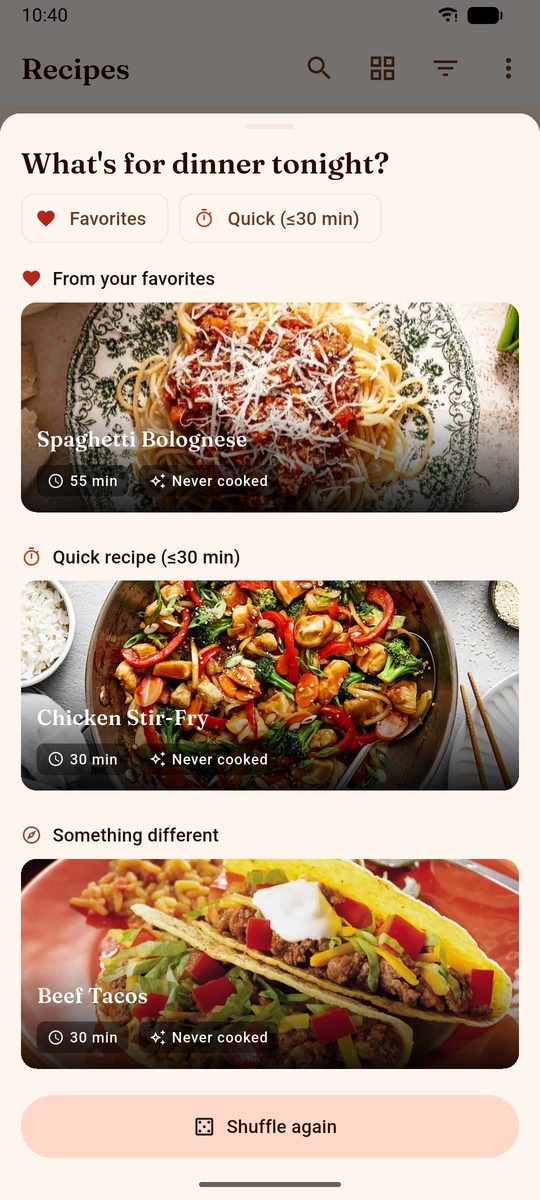
When the heuristics aren't cutting through and you just want something to pick for you, DinnerFlow's Surprise Me feature does exactly that: one tap, and a short set of concrete options out of your own library, each one already argued for.
How it works
Tap Surprise Me and the app draws a few suggestions and, more usefully, labels why each is there: one from your favourites, one quick enough for a weeknight, and one it files under something different, which is how a recipe you last cooked in March comes back into view. Every card carries its cooking time and whether you have ever actually made it. If none of them land, one more tap redraws the whole set.
Configurable filters
Two chips at the top of the sheet narrow what it can draw from, favourites only, or quick only, and you decide what "quick" means: the threshold is a number you set, not a fixed thirty minutes. So on a tired Tuesday with twenty minutes free, Surprise Me is drawing from your twenty-minute recipes, and the slow Sunday projects are not in the pot at all.
Why random works better than browsing
Browsing recipe apps or food websites when you can't decide introduces the paradox of choice: more options make the decision harder, not easier. Random selection from a constrained set skips the browsing entirely and gives you a concrete option to either accept or reject. Rejection is easy. It takes one tap. The alternative, finding something good through open-ended browsing, can take an hour.
Why your own library beats recipe discovery
When you can't decide what to cook, searching the internet for inspiration feels like it should help, but it usually makes things worse. You're not short of options; you're short of good filtered ones. Recipe discovery sites show you thousands of things you've never tried, none of which have been validated by your household's preferences.
The validation problem
Every recipe in your personal library has cleared a bar that internet recipes haven't: you chose to save it, and in most cases you've made it at least once and decided it's worth keeping. That's not a trivial filter. Your saved recipes are the ones your household actually likes, that fit the ingredients you typically buy, and that you know how to execute. A random recipe from the internet comes with none of that assurance.
Decision anxiety
Choosing from your own library is psychologically easier than choosing from the internet because the stakes are lower. You already know these recipes work. Picking one from your library at 6pm means choosing between things you've decided you like, not making a bet on something new when you're already tired and hungry.
This is why a random recipe picker works best when it draws from your own saved recipes rather than from an external database. The randomness solves the decision paralysis; your pre-curated library solves the quality assurance.
Planning dinners ahead as the permanent fix
The approaches above are for nights when you're already at 6pm with no plan. The permanent solution to the dinner question is to move the decision to a moment when you have time, energy, and a full picture of the week, which is to say, earlier in the week.
Weekly meal planning means the "what's for dinner?" question is answered on Sunday for the whole week. You make five or six decisions in a 20-minute session, assign them to specific days, and the rest of the week you just cook, no deciding required. Monday is pasta. Tuesday is sheet-pan chicken. Wednesday is whatever you planned. The cognitive load of seven dinner decisions is replaced by one brief planning session.
This isn't just about reducing stress (though it does). It also means you shop once for the whole week's ingredients rather than every other day for one forgotten item, and you cook more confidently because you chose the recipe when you weren't tired and hungry.
The DinnerFlow weekly meal planning calendar supports exactly this: assign recipes to days, see the whole week at a glance, and generate a grocery list from every planned recipe in one tap. See our complete guide to weekly meal planning for the full routine.
Common questions, answered.
What should I cook for dinner tonight?
Start with two quick filters: how much time do you have, and what's already in your fridge? Under 30 minutes means pasta, eggs, stir-fry, or a grain bowl. Something in the fridge that needs using up should anchor the meal. If you have a recipe app with a random picker, let it choose from recipes you already know you like, that removes the decision entirely without requiring you to browse the internet for something new.
Is there an app that picks a recipe for you?
Yes. DinnerFlow has a Surprise Me feature that picks a random recipe from your personal library with one tap. You can configure filters so it only draws from recipes that fit your situation, quick recipes, vegetarian options, and so on. Because it picks from recipes you've already saved, you know the result is something your household actually likes.
How does the Surprise Me feature work?
Tap Surprise Me in DinnerFlow and the app picks a random recipe from your library. You can set filters before tapping, for example, to only show quick recipes or recipes tagged a particular way. If you don't like the suggestion, tap again for a different one. It draws exclusively from your own saved recipes, not from an external database.
What to cook when you have no ideas?
Narrow the choice before you start browsing: how much time do you have, what's already in the fridge, and how tired are you? These three filters usually reduce the options to a manageable shortlist. If you use DinnerFlow, Surprise Me picks from recipes you already know you like, which is faster and less stressful than open-ended recipe discovery when you're already hungry.
How do I stop asking "what's for dinner?" every night?
Weekly meal planning eliminates the question entirely. Spend 20 minutes on Sunday assigning recipes to specific days. The decision is made once, in a calm moment, rather than seven times under pressure at 6pm. DinnerFlow's weekly dinner calendar assigns recipes to days and generates a grocery list automatically so everything needed is already at home.
What is a quick and easy dinner when you can't decide?
The quickest reliable dinners are ones you've made so many times you can cook them without thinking: pasta with whatever's in the fridge, eggs in various forms, a simple stir-fry over rice, a grain bowl with roasted vegetables. These work not because they're interesting but because the decision cost is nearly zero. You already know how to make them.
Can I filter the random recipe by ingredients I have?
In DinnerFlow, you can filter the Surprise Me random picker by tags you've assigned to recipes in your library, for example, a 'quick' tag for recipes under 30 minutes. This narrows the random selection to recipes that fit your current situation without browsing.
How DinnerFlow handles the dinner decision.
DinnerFlow approaches the dinner question at two levels: for tonight, with a random recipe picker that draws from your own library; and for the whole week, with a meal planning calendar that moves the decision to Sunday morning.
One tap to a decision. Every night.
Build a recipe library from your favourite meals. Let Surprise Me pick when you can't decide. Or plan the whole week on Sunday and never face the question again.
- Surprise Me, random recipe picker with configurable filters, drawn from your own library.
- Recipe library, save recipes from any website, cookbook photo, or text in seconds.
- Weekly dinner calendar, assign recipes to specific days; know what's for dinner before Tuesday.
- One-tap grocery list, generated from every planned recipe, sorted by aisle, shared in real time.
- Cook mode, full-screen step-by-step guide with wakelock so your screen stays on while you cook.