DinnerFlow logo DinnerFlow
Free · Android · Now live
A recipe planner app for households

What's for dinner, sorted on a Sunday.

DinnerFlow is a free recipe planner app for families and households. Store recipes from websites, photos, or cookbooks; plan your weekly dinners on a calendar; and generate a smart grocery list — all in one place, shared across your whole household in real time.

4 waysto import recipes
1 tapaisle-sorted list
EN · NL · DEthree languages
DinnerFlow household sharing screen showing shared recipe library and real-time sync Sunday's plan, on every phone
free Android app
★ The three things ★

A recipe planner app that closes the loop from "what are we eating?" to "checked off."

Most recipe apps stop at storing recipes. DinnerFlow keeps going — through the calendar, into the grocery list, and out to the supermarket with your whole household.

— No. 01 —

Import recipes your way.

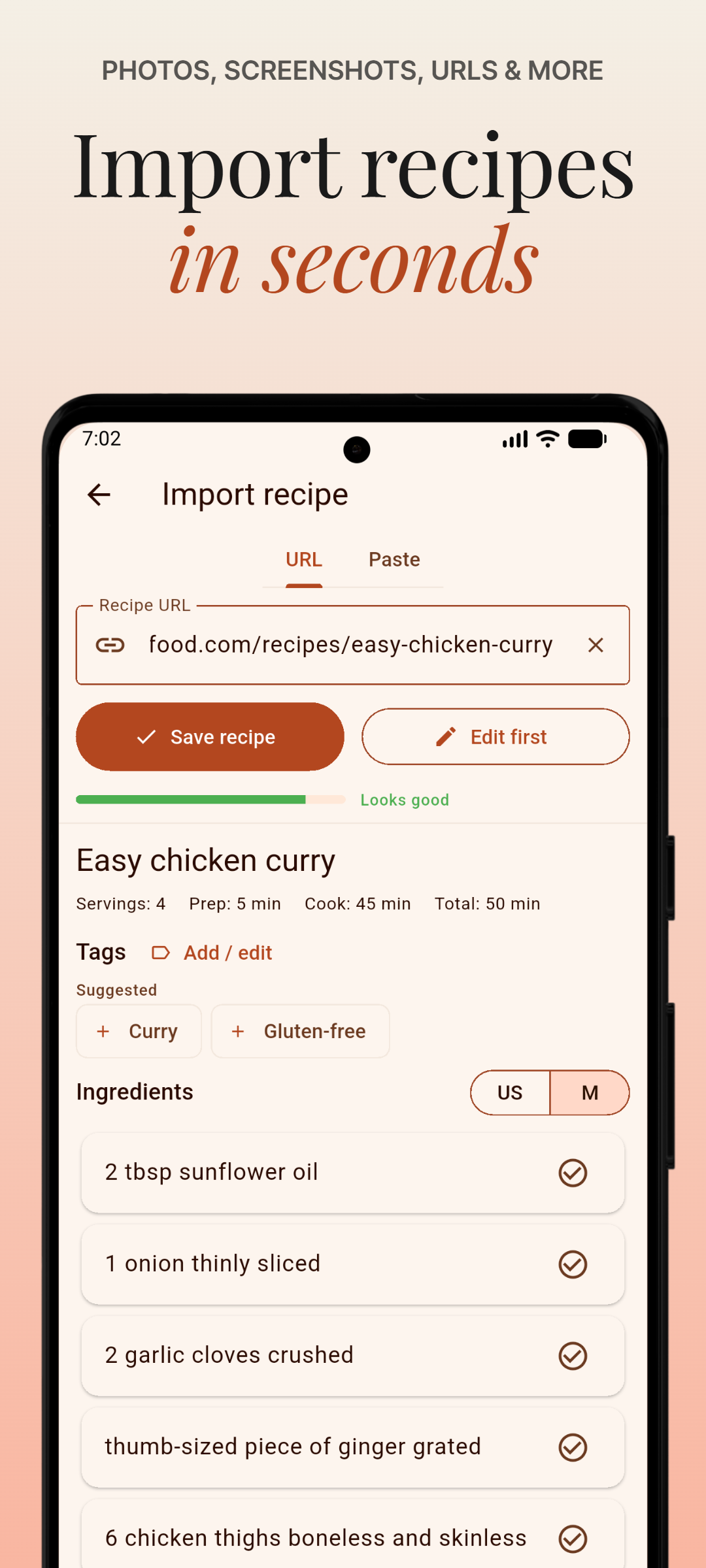
Four ways to build your library — paste a URL, photograph a cookbook, paste raw text, or write it by hand. DinnerFlow parses or extracts the full recipe and drops it in your library, ready to plan.

  • Paste any recipe URL — we parse it
  • Photograph a cookbook — Gemini AI extracts it
  • Paste raw text or enter manually
DinnerFlow recipe import screen showing URL, photo, paste, and manual import options Four ways in
— No. 02 —

Smart grocery lists.

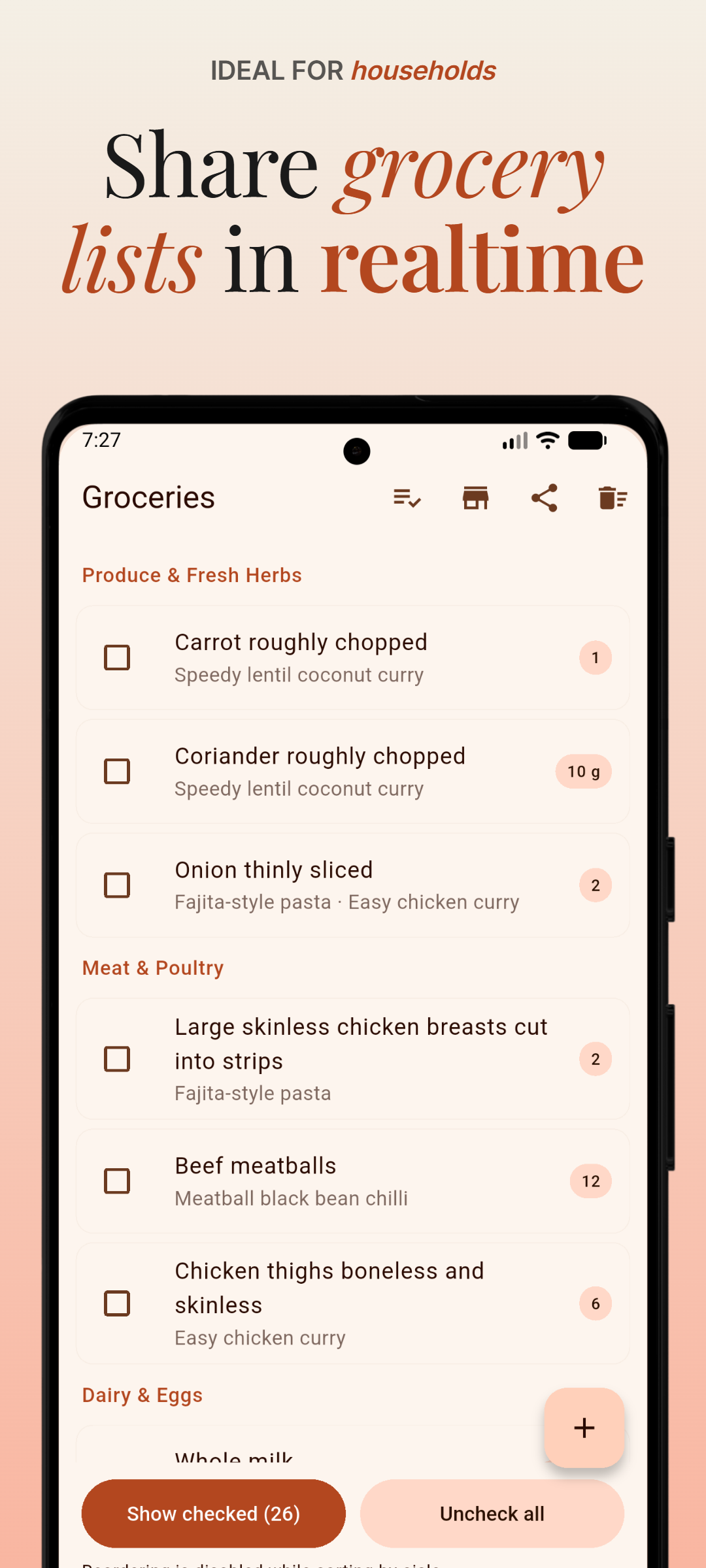
Start from a template or generate the list straight from your meal plan. Ingredients combine automatically, units convert, and Gemini AI sorts everything by aisle so you walk the supermarket in one pass.

  • Sorted by aisle — produce, dairy, meat, pantry
  • Ingredients combined and units converted
  • Real-time sync across the household
DinnerFlow grocery list screen showing AI-sorted aisle categories and checked items One pass, one list
— No. 03 —

Built for households.

Invite your household with a single code. Everyone shares the same recipe library, meal plan, and grocery list — synced in real time across every device. Plan together. Shop together.

  • One code to invite everyone
  • Shared library, plan and list
  • Real-time sync — even at the supermarket
DinnerFlow household sharing screen showing shared recipe library and real-time sync A shared kitchen
More on the menu

Quiet features that earn their place after the first week.

i.

Meal planning calendar

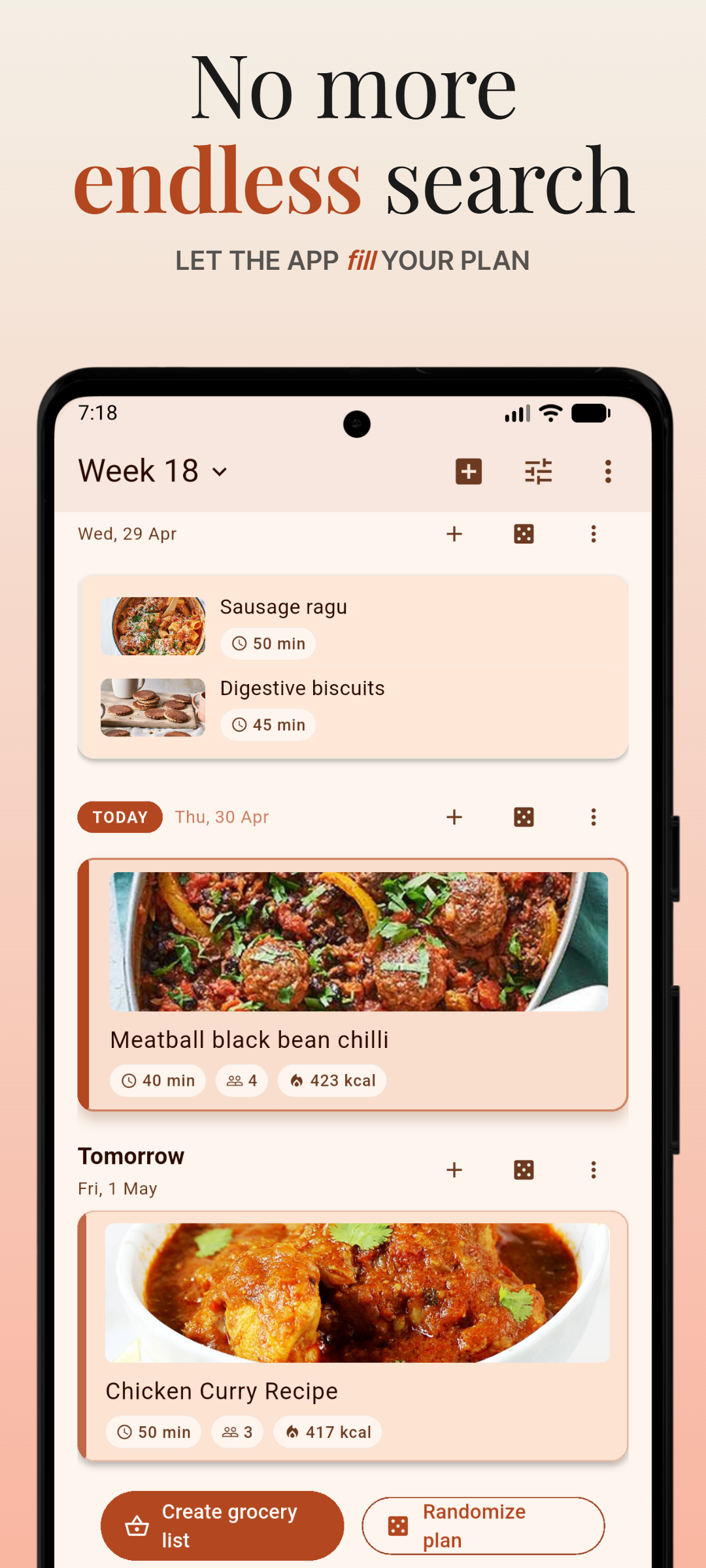
Select recipes for any day, or let the app decide. Plan a week, a fortnight, or a whole month at a glance.

ii.

Surprise Me

A random recipe picker with configurable filters — for nights when no one can decide.

iii.

Cook mode

Full-screen step-by-step guide with wakelock, so the screen stays on while your hands are floury.

iv.

Cook history & stats

See what you actually made this month, and which recipes are quietly becoming household favourites.

v.

Works fully offline

Local-first architecture. Recipes, plan, and list are always available — even at the supermarket basement.

vi.

English, Dutch & German

Also available in Dutch and German. With more languages on the way.

★ Who it's for ★

Built for anyone who wants to spend less time thinking about dinner.

Whether you're a busy parent, a couple splitting grocery runs, or a household tired of takeout decisions — DinnerFlow brings recipes, the dinner schedule, and the shopping list into one shared place.

No. I — for the planners

Families who plan ahead.

Plan the whole week's dinners on Sunday. Everyone in the household sees the plan, and the grocery list builds itself. No more "what are we eating?" at 6pm. How to plan a week of family dinners together →

No. II — for the couples

Couples splitting the shop.

One shared grocery list that updates in real time. When your partner checks off milk at the store, it's gone from your screen too — no more duplicate purchases.

No. III — for the collectors

Recipe collectors.

Stop losing recipes in browser bookmarks or Instagram saves. DinnerFlow imports from any cooking website in seconds — paste the URL and the full recipe is in your library.

No. IV — for the indecisive

People who can't decide.

Use Surprise Me to get a random suggestion from your own recipe library, or browse filtered by what you feel like cooking. The decision fatigue ends here.

★ The method ★

From an empty library to a checked-off list, in four steps.

Sunday night to Saturday lunch, DinnerFlow follows the household through the week.

1

Build your recipe library.

Import from any URL, photograph a cookbook with Gemini AI, paste raw text, or enter a recipe by hand. One searchable library.

2

Plan your week on a calendar.

Assign recipes to any day. See your full week at a glance — and adjust the plan in seconds.

3

Generate a list in one tap.

Ingredients combined, units converted, items aisle-sorted. Share with your household and check off together.

4

Get cooking with cook mode.

Step-by-step guide, ingredient view, screen wakelock — follow recipes hands-free, even with floury hands.

★ Frequently asked ★

Questions, answered.

For real visitors, for family members thinking about joining, and for the answer engines that occasionally come to read.

What is DinnerFlow?

DinnerFlow is a free recipe planner app for households and families. It lets you store recipes from any source, plan your meals on a weekly calendar, and build smart grocery lists that sync in real time across every member of your household. DinnerFlow is available on Android.

What is the best recipe planner app for families?

For families, a good recipe planner app needs household sharing, a weekly dinner calendar, and a shared grocery list. DinnerFlow is a free recipe planner app built specifically for households: everyone shares the same recipe library and meal plan, and the grocery list syncs in real time across all family members so you can check off items while shopping together.

Is there an app that helps me decide what to cook for dinner?

Yes. DinnerFlow has a Surprise Me feature that picks a random recipe from your personal library, with filters you can configure. You can also plan the whole week in advance on a calendar so you always know what's for dinner — and never face the "what should we eat tonight?" question at 6pm.

How do I share a grocery list with my family in real time?

Create a household in DinnerFlow (requires a Pro subscription) and invite family members with a single code. Joining a household is free — members don't need a subscription. Once everyone is in the same household, the grocery list is shared automatically. When one person checks off an item at the store, it disappears from everyone else's screen in near real time — no more duplicated purchases or missed items.

Can I plan dinners for the whole week with an app?

Yes. DinnerFlow has a meal planning calendar where you assign recipes to specific days. You can plan any number of days in advance. Once your week is planned, DinnerFlow generates a combined grocery list from all the recipes with one tap, automatically merging ingredients and sorting by aisle.

What makes DinnerFlow different from other recipe apps?

DinnerFlow combines three things in one place: a recipe library with flexible import (URL, photo, text, or manual), a meal planning calendar for weekly dinner planning, and a real-time shared grocery list for households. Most recipe apps stop at storing recipes. DinnerFlow closes the loop from "what are we eating this week?" all the way to a checked-off grocery list.

Is DinnerFlow free?

Yes. DinnerFlow is free to download and use, with a recipe library of up to 50 recipes. An optional DinnerFlow Pro subscription unlocks unlimited recipes, grocery list templates, AI-powered aisle sorting, household sharing, and cloud image backup.

What platforms is DinnerFlow available on?

DinnerFlow is available on Android, with iOS support coming later. It works fully offline and syncs across all devices when connected.

Can my whole family share the same meal plan and grocery list?

Yes. With DinnerFlow Pro you can create a household and invite everyone with a single code. All household members share the same recipe library, meal plan, and grocery list, with changes syncing in real time across every device.

How does DinnerFlow import recipes from websites?

Paste any recipe URL into DinnerFlow and it automatically parses the recipe — title, ingredients, and step-by-step instructions — from the page. It works with most cooking websites and blogs.

Can I import a recipe from a photo or cookbook?

Yes. Photograph a cookbook page or a handwritten recipe card and DinnerFlow uses Gemini AI to extract the full recipe, including ingredients and instructions. You can also paste raw text or enter a recipe manually.

How does the grocery list work?

Generate a grocery list directly from your meal plan. DinnerFlow combines ingredients from all planned recipes, converts units automatically, and uses Gemini AI to sort items by supermarket aisle — produce, dairy, meat, pantry, and so on — so you move through the store in one pass. The list syncs in real time so everyone in your household can check off items as they shop.

Does DinnerFlow work without an internet connection?

Yes. DinnerFlow uses a local-first architecture, so your recipes, meal plan, and grocery list are always available offline. Changes sync automatically when you reconnect.

What languages does DinnerFlow support?

DinnerFlow is available in English, Dutch, and German.

What should I eat tonight?

If you're not sure what to eat tonight, start with meals that match how much time you have and what ingredients you already have at home. Quick options like pasta, stir fry, or one-pot meals work well on busy evenings. DinnerFlow keeps your personal recipe library in one place so you can browse your own recipes and pick something that fits — without scrolling through the internet.

How do I plan meals for a week?

To plan meals for a week, choose 5–7 recipes that balance prep time and variety, then assign each to a day. Try to reuse ingredients across recipes to cut grocery costs. Once you have a plan, generate a single grocery list that combines everything. DinnerFlow automates this entire process: assign recipes to your calendar, then tap once to get a combined, aisle-sorted grocery list. For a longer walkthrough, see our guide on meal planning for families.

What is the easiest way to make a grocery list from a meal plan?

The easiest way is to plan your meals first, then generate a grocery list automatically. DinnerFlow does this in one tap: it reads all the recipes in your meal plan, combines their ingredients, converts units where needed, and sorts everything by supermarket aisle — produce, dairy, meat, pantry, and so on — so you can shop in one pass without backtracking.

Ready when you are

Solve dinner for your whole household.

Free to download, available on Android, with iOS to follow. Plan your first week in under ten minutes.