Most couples run their grocery shopping on two parallel, slightly-out-of-sync systems. One of you keeps a list in a notes app; the other remembers three things and texts them over halfway to the store. Someone buys milk you already had. Someone forgets the one thing dinner actually needed. By the time you're both home, there are two lists, one of them on a receipt, and neither is right.
The problem isn't organisation. It's that two people are maintaining one shopping trip from two separate places. The fix isn't a better personal list. It's a single list that both of you can see and change at the same time, from wherever you are.
How real-time sync actually works
When you and your partner are in the same DinnerFlow household, the grocery list isn't copied between your phones. It's the same list, shown in two places. Add pasta on your phone and it appears on your partner's within seconds. Check off milk at the store and it vanishes from their screen too.
That last part is what stops duplicate purchases. The classic couples failure. You both grab the same carton because neither knew the other did, simply can't happen when checking something off removes it from both screens live. The list is always the current truth, not a snapshot from before you left the house.
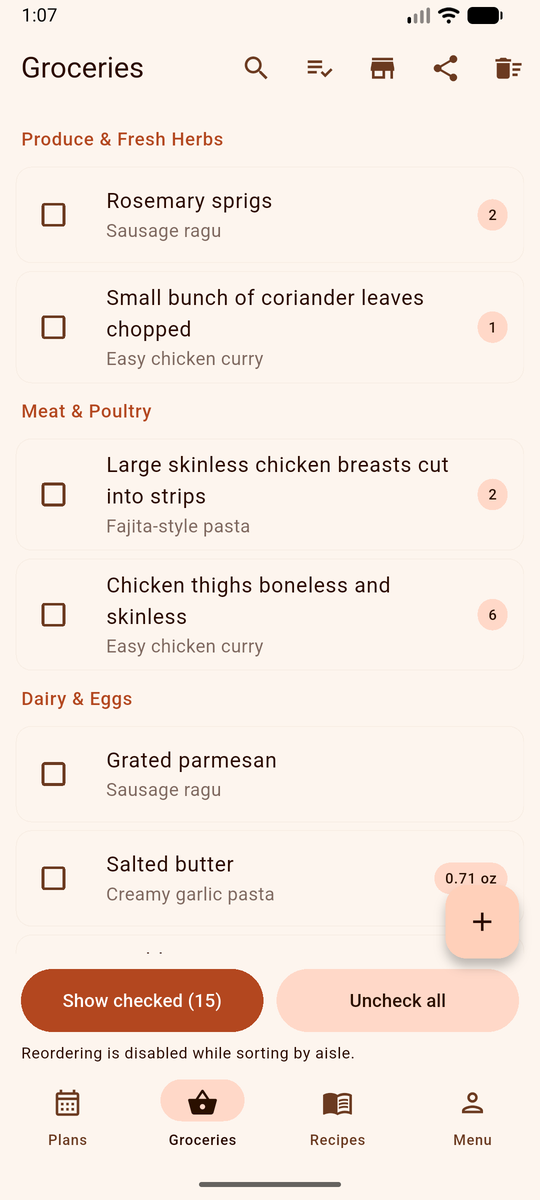
And because DinnerFlow is local-first, the list still works if the supermarket has no signal: your changes save on the device and sync the moment you're back online.
Splitting the shop between two people
A shared live list unlocks the most efficient way for a couple to shop: divide and conquer. Because DinnerFlow sorts the list by supermarket aisle automatically, you can split it cleanly:
- One of you takes produce, dairy and meat; the other takes pantry, frozen and household.
- Each person checks off their items as they go, so you can both see what's already in a cart.
- You meet at the checkout with everything gathered, often in half the time a single-trolley trip would take.
Without a shared live list this is impossible: you'd have no way to know whether your partner already grabbed the thing you're standing in front of. With one, splitting up is the obvious move.
Planning dinners together, not solo
The grocery list is downstream of a bigger question couples wrestle with: what are we actually eating this week? When one person owns the meal planning, they own the whole invisible job: deciding, remembering, listing, shopping. A shared plan splits it.
In a DinnerFlow household you share a weekly dinner calendar as well as the list. Either partner can assign recipes to days, so planning becomes a five-minute joint decision instead of one person's recurring chore. Then the payoff: DinnerFlow reads every recipe in your shared plan and builds the grocery list from all of them in one tap, ingredients merged, units converted, sorted by aisle. The list you both shop from writes itself from the week you planned together.
For the full routine, see our guide to making a weekly meal plan and how a meal planner generates the grocery list automatically.
Setting it up as a couple
Getting two phones onto one shared list takes a couple of minutes:
- Both install DinnerFlow on your Android phones and open the app.
- One partner creates the household. Creating a household needs a DinnerFlow Pro subscription, just for the person who sets it up.
- Invite your partner with the household code. They tap join and enter it. Joining is always free, the second person never pays.
- Open the grocery list. You now share one list, one recipe library, and one meal plan, synced in real time across both phones.
From then on it just works in the background: add things as you think of them, plan the week between you, and split the store on shopping day.
Common questions, answered.
What is the best grocery list app for couples?
The best grocery list app for couples gives both partners the same list and updates it in real time, so you never carry two half-finished lists or buy the same thing twice. DinnerFlow is built for this: create a shared household, invite your partner with a single code, and you both see one grocery list. Check off an item at the store and it disappears from the other's screen instantly. You can also plan the week's dinners together, and the list builds itself from the plan.
Can two people share the same grocery list?
Yes. One partner creates a household and the other joins with a single invite code. From then on you share one grocery list, one recipe library, and one meal plan, all synced in real time across both phones. Anything either of you adds or checks off appears immediately on the other's device.
How do we share a shopping list in real time?
Both partners install DinnerFlow, join the same household, and open the shared grocery list. Changes sync within seconds: add an item on your phone and it appears on your partner's; check one off at the store and it vanishes from theirs. That lets you split up in the supermarket, one takes produce and dairy, the other pantry and frozen, working from the same live list without overlap.
Is the shared grocery list free?
Joining a household is always free, so one partner never pays. Creating the shared household requires a DinnerFlow Pro subscription for one person, usually whoever sets things up. Once the household exists, both of you share the grocery list, recipe library, and meal plan, and only the creator's account needs Pro.
Can we plan meals together as a couple?
Yes. A shared household includes a shared weekly meal calendar. Either partner can assign recipes to days, so you plan the week together instead of one person carrying the mental load. Once the dinners are planned, DinnerFlow generates a combined, aisle-sorted grocery list from every recipe in one tap, and that's the same list you both shop from.
How do I share my shopping list with someone else?
In DinnerFlow you share a shopping list by creating a household and inviting the other person with a single code, no exporting or forwarding. Once they join, you both share the same live list: anything you add or check off shows up on their phone within seconds. It works the same whether you're sharing with a spouse, partner, roommate, or the whole family, and only the person who creates the household needs DinnerFlow Pro, joining is always free.
Is there a shopping list app for two people?
Yes, DinnerFlow is made for exactly this. A shopping list for two people works best when both see the same list in real time: one person creates a household, the second joins with a code, and from then on you share one grocery list that syncs across both phones. Whether you're a couple, roommates, or any two-person household, whatever one of you adds or checks off appears instantly for the other, so nothing gets bought twice.
Does it work if we both have iPhones?
DinnerFlow is currently on Android, with an iOS version in development. For now, both partners need an Android phone to share a list. If one of you is on iPhone, it's worth waiting for the iOS release or following DinnerFlow for updates.
How DinnerFlow keeps two shoppers in sync.
DinnerFlow is a free meal planning app for Android with household sharing built in, designed so two people can run one kitchen from two phones.
One list. Two phones. Always in sync.
Share a grocery list that updates in real time, plan the week's dinners together, and split the supermarket without buying doubles.
- Real-time shared list, check off an item and it disappears from your partner's screen too.
- Aisle-sorted automatically, split the store cleanly between the two of you.
- Shared weekly calendar, either partner plans dinners; nobody carries the whole load.
- One-tap grocery list, built from every recipe in your shared plan.
- Free to join, only one of you needs Pro to create the household.
 On a computer? Point your phone camera at the code to install DinnerFlow.