The simplest grocery list app for roommates is one where the whole house shares a single live list, everyone adds to it, anyone can shop from it, and checking something off updates it for all of you at once. DinnerFlow does exactly that, free on Android: one person creates a shared household, everyone else joins with a code, and you all see the same list on your own phones.
Without that, a shared house runs its groceries on a group chat and a lot of hope. Someone types "we're out of pasta" into WhatsApp at 2pm; three people see it, nobody's sure who's shopping, and two of you come home with pasta anyway. The whiteboard on the fridge only works if you're standing in front of the fridge. And the flatmate who does a big shop has no idea what the others already grabbed.
The problem isn't that your house is disorganised. It's that a shared kitchen is being tracked from four separate phones with no single source of truth. The fix isn't a better group chat. It's one shopping list everyone in the house is looking at, live.
Before anything else: what this is not
Most apps aimed at flatshares bundle everything, chore rotas, rent-splitting, house chat, so it is worth saying early what this one leaves out. If the missing pieces are the ones your house actually needs, you can stop reading here and go find a better fit:
- It doesn't split grocery costs. DinnerFlow won't track who owes whom or divide the receipt. For that, run something like Splitwise alongside it, the two do different jobs and pair well.
- It isn't a chore chart. No cleaning rotas or bin schedules. If your house needs those, a household-manager app (Flatastic, OurFlat) covers them.
What is left is narrower and, we would argue, the part flatshares most often get wrong: the shared shopping list, sorted by supermarket aisle, generated from recipes if you want it to be, and writable by everyone at once. Settle the money separately.
Nobody owns the list, which is the point
In most houses the groceries quietly become one person's job, not by agreement but because the list lives on their phone. Take the list off any single phone and that job dissolves:
- Anyone tops it up. Run low on something, add it there and then, not "I'll tell the group later" (you won't).
- Whoever's passing the shop grabs it. The person nearest the supermarket does the run, working from the up-to-date list instead of guessing.
- Nobody double-buys. Because ticks sync live, two people out at once won't come home with the same three things.
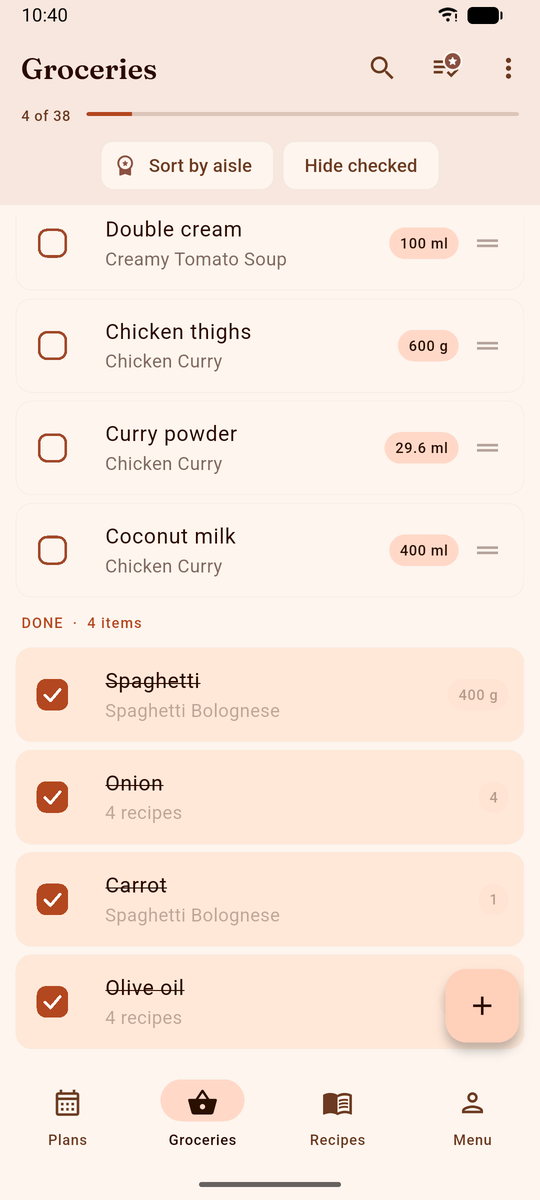
It also quietly ends the "I always end up doing the shopping" resentment, because the work becomes visible. Everyone can see the list shrinking and who is making it shrink.
Four people writing to one list, at the same time
Two people sharing a list barely need to think about how it works. Four do, because with four writers the awkward cases stop being hypothetical: two of you add the same thing within a minute of each other, someone deletes an item another person just put on, and somebody is always in a basement with no signal.
The list is not copied between phones and then reconciled. It is one list that several phones are looking at, so there is no "my version" to lose. Practically, that means three things a house notices:
- Every line says where it came from. An item added off the back of a recipe carries that recipe's name, so "why is there 400g of mince on here?" answers itself instead of turning into a group-chat thread.
- Quantities add up rather than stack up. If two planned meals both want onions, the list shows one onion line with the total, not two lines to puzzle over in the aisle.
- No signal is not a broken list. The app keeps its own copy on each phone, so the list opens and ticks off in a dead-zone supermarket and catches up with everyone else when the signal returns.
The failure this removes is specific, and it is the one shared houses actually hit: somebody shops from what they remember the list saying when they left the flat. Here there is nothing to remember, because the list in their hand is the list.
If your house actually cooks together
Not every shared house cooks as a group, plenty of flatmates just want a shared list for shared basics (loo roll, milk, bin bags, coffee), and DinnerFlow works fine used that way on its own. But if some of you do cook together, there's a second gear.
A DinnerFlow household includes a shared weekly meal calendar anyone can add to. Assign a few dinners the house will eat together, and DinnerFlow builds one combined, aisle-sorted grocery list from every recipe in a tap, ingredients merged, units converted, dropped straight onto the same list everyone shops from. It's the difference between a list of random basics and a list that actually covers the week's meals. See how the shared grocery list and plan-to-list work in detail.
What it takes to get four phones on one list
Four people, four phones, one list. The setup is short and only one person has to do the fiddly part:
- Everyone installs DinnerFlow on their Android phones and opens the app.
- One flatmate creates the household. Creating a household needs a DinnerFlow Pro subscription, just for that one person. It's a fair thing for the house to split, or for whoever wants it most to cover.
- Invite the others with the household code. They tap join and enter it. Joining is always free, nobody else pays.
- Open the grocery list. You now share one live list (and, if you want it, one recipe library and meal plan) synced across every phone.
From then on it runs in the background: add things the moment you notice they're low, and whoever's near the shop clears the list.
Common questions, answered.
Does DinnerFlow split grocery costs between roommates?
No, DinnerFlow is a shared grocery list and meal planner, not a bill-splitting app. It doesn't track who owes whom or divide the receipt. For splitting costs, use a dedicated app like Splitwise alongside it. DinnerFlow's job is making sure the house buys the right things once, without duplicates or forgotten items; settling the money is separate.
How do roommates share one grocery list?
One roommate creates a household in DinnerFlow and invites the others with a single code, no accounts to juggle. From then on everyone shares the same live list: anything anyone adds or checks off shows up on every phone within seconds. Whether there are two of you or five, it's one list the whole house works from, at home and in the store.
How many people can share a grocery list in DinnerFlow?
A household can include your whole shared house, the list, recipe library, and meal plan are shared with every member who joins, and everyone sees changes in real time. Only the person who creates the household needs DinnerFlow Pro; the rest join for free, which suits a house of three, four, or five sharing one list.
What is the best grocery list app for roommates?
The best grocery list app for roommates gives everyone in the house the same list and updates it in real time, so nobody carries a separate list or buys the same thing twice. DinnerFlow is built for this: one roommate creates a shared household, everyone else joins for free with a single code, and the whole house sees one grocery list. Add an item on your phone and it appears for everyone; check one off at the store and it disappears from their screens too.
Can roommates plan meals together too, not just the list?
Yes, if your house cooks together. A shared household includes a weekly meal calendar anyone can add to, and DinnerFlow builds one combined, aisle-sorted grocery list from every planned recipe in a tap. If your roommates cook separately, you can skip the planning and just use the shared list on its own. It works either way.
Is there a free shared grocery list app for a shared house?
Yes. DinnerFlow is free to download and use, and joining a household is always free, so most of the house never pays. Creating the shared household needs one DinnerFlow Pro subscription, typically whoever sets it up, or a cost the house splits between them. After that, everyone shares the same real-time grocery list for free.
What DinnerFlow does for a shared kitchen.
DinnerFlow is a free meal planning app for Android with household sharing built in, designed so several people can run one kitchen from their own phones.
One list. Every phone in the house.
Share a grocery list that updates live for the whole household, and, if you cook together, let it build from the recipes you're actually making.
- Real-time shared list, anyone adds, anyone shops, ticks sync for everyone.
- Aisle-sorted automatically, one clean pass through the supermarket.
- Free for the house, only one person needs Pro to create the household; everyone else joins free.
- Optional shared meal plan, build the list from recipes the house eats together.
- Works offline, local-first, available with no signal at the store.
 On a computer? Point your phone camera at the code to install DinnerFlow.