The simplest grocery list app for a family is one where the whole household shares a single live list. Both parents add to it, the kids who are old enough can too, and whoever ends up at the store checks things off for everyone at once. DinnerFlow does that, free on Android. One parent creates a shared household, the family joins with a code, and everyone sees the same list on their own phone.
Without it, family shopping runs on odds and ends. There's a list stuck to the fridge that only helps while you're standing in the kitchen. There are a few things texted to whoever is driving to the shop. And there's a great deal held in one parent's head. The teenager empties the cereal box and mentions it to nobody. Someone buys bread that was already in the cupboard. The one ingredient dinner actually needed gets left off, because the list was written from memory hours after anyone last looked in a cupboard.
None of that means your family is disorganised. It means a household kitchen is being tracked from several phones with no shared source of truth. What fixes it isn't a firmer rule about writing things down. It's one grocery list the whole family is looking at, live.
Everyone in the family adds to the grocery list
The point of a household list is that remembering everything stops being one parent's job. Because the whole family sees the same live list, the person who notices something has run out is the person who puts it on:
- The kids can add too. A teenager who finishes the cereal, or a younger child asking for a particular snack, adds it from their own phone rather than leaving it to live in nobody's memory.
- Both parents top it up. Whoever notices the washing-up liquid getting low adds it on the spot, not "I'll mention it later," which tends to mean never.
- Nothing rests on relaying it. Items no longer have to be remembered and handed to the shopping parent. They're already on the one list that parent will shop from.
Once whatever someone adds shows up for everyone straight away, the whole "did anyone write down that we need…?" ritual quietly disappears.
Two parents, one shop, no duplicates
A shared, real-time list quietly settles one of the most familiar family-shopping annoyances: two people buying at the same time. One parent does the big weekly supermarket run while the other picks a few things up on the way home. Because both are checking off the same list live, items clear as they're bought.
Neither parent walks in with a second loaf of bread, and nothing slips through because each assumed the other had grabbed it. DinnerFlow also sorts the list by supermarket aisle, so a big family shop moves faster. You go through the store once, in order, rather than doubling back for the thing you skipped two aisles ago.
It holds up offline as well. DinnerFlow keeps your data on the device first, so the list carries on working in a supermarket with no signal and syncs again the moment you're back online.
The family staples you buy every week
Family shopping has a big fixed core: the milk, bread, eggs, lunchbox fillers, cleaning supplies and snacks you pick up almost every week whatever dinner happens to be. Typing that out again each time is wasted effort.
DinnerFlow lets you keep a grocery list template of your family's regulars and drop the whole set onto the week's list in one tap, then add the recipe-specific ingredients on top. The school-lunch staples, the weekend-breakfast things, the household basics that barely change from week to week: captured once, reused every week, shared with everyone who shops.
Or let it build from the week's meal plan
Plenty of families are happy just sharing the live list for staples and adding things as they run low, and DinnerFlow works perfectly used that way. If you do plan the week's dinners, though, there's a second gear.
Assign recipes to a shared weekly calendar and DinnerFlow builds one combined, aisle-sorted grocery list from every recipe in a tap, with ingredients merged across meals and units converted, dropped straight onto the same list the family shops from. The planning side of that is its own routine, covered in our guide to meal planning for families. This page is about the list it produces and the household that shares it.
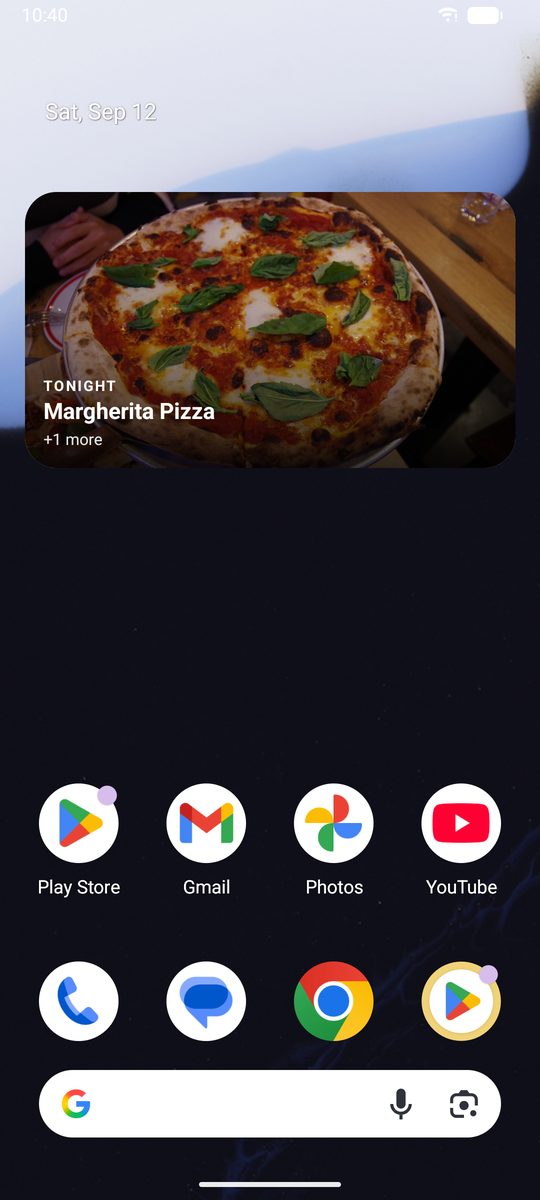
There is a side effect worth knowing about, because it answers the question a family kitchen gets asked more than any other. Once dinners are on the shared calendar, a home-screen widget shows tonight's meal without anyone opening the app:
One parent sets it up, everyone else just joins
The asymmetry matters here: the setup, and the subscription, land on one person only.
- Everyone installs DinnerFlow on their Android phones and opens the app.
- One parent creates the household. Creating a household needs a DinnerFlow Pro subscription, just for that one account.
- Invite the family with the household code. Each person taps join and enters it. Joining is always free, so nobody else pays.
- Open the grocery list. The family now shares one live list, plus one recipe library and meal plan if you want them, synced across every phone.
After that it runs in the background. Everyone adds what they notice is low, and whoever does the shop clears the list.
Common questions, answered.
How is this different from a family meal planning app?
A family meal planning app decides what you will cook each week. This is about the shopping list that follows. In DinnerFlow the two connect: plan the week's dinners on a shared calendar and it builds one combined, aisle-sorted grocery list from every recipe. You do not have to plan to use the list, though. Many families just share the live list for staples like milk, bread, lunchbox bits and cleaning supplies, and add recipe ingredients on top.
Can two parents shop at the same time without buying duplicates?
Yes, and it is one of the biggest wins for a family. Because the list syncs in real time, one parent at the big supermarket and the other grabbing a few things elsewhere both watch items clear as they are bought. Neither comes home with a second loaf of bread, and nothing gets missed because each assumed the other had it.
What is the best grocery list app for a family?
The best grocery list app for a family gives the whole household one shared list that updates in real time, so both parents (and kids old enough) add to the same list and nobody buys the same thing twice. DinnerFlow is built for this. One parent creates a household, everyone joins for free with a single code, and the family shares one grocery list. Add an item on your phone and it appears for everyone. Check one off at the store and it clears from their screens too.
How do families share a grocery list?
One family member creates a household in DinnerFlow and invites the others with a single code. From then on the whole family shares the same live list, so whatever anyone adds or checks off shows up on every phone within seconds. The parent who plans and the parent who shops are always looking at the same list, and anyone who notices the milk is low can add it on the spot instead of hoping to remember.
Is there a free grocery list app for families?
Yes. DinnerFlow is free to download and use, and joining a household is always free, so the whole family except one person never pays. Creating the shared household needs a single DinnerFlow Pro subscription, usually a parent. After that, every family member shares the same real-time grocery list for free.
Can my kids add to the family shopping list?
Yes. Anyone you invite to the household can add items to the shared list from their own phone, so a teenager who finishes the cereal or a partner who spots the washing-up liquid running low can put it on the list themselves. Whatever they add appears straight away for whoever does the shopping, so nothing depends on someone remembering and passing it on.
What DinnerFlow does for a family kitchen.
DinnerFlow is a free meal planning app for Android with household sharing built in, designed so a whole family can run one kitchen from their own phones.
One list. The whole family's phones.
Share a grocery list that updates live for the whole household. Everyone adds, whoever shops checks off, and it builds from the recipes you're cooking if you want it to.
- Real-time shared list, with both parents and the kids adding and ticks syncing for everyone.
- Aisle-sorted automatically, for one clean pass through a big family shop.
- Free for the family, since only one parent needs Pro to create the household and everyone else joins free.
- Reusable staples template, dropping your weekly regulars onto the list in one tap.
- Builds from your meal plan, as a combined, unit-converted list from every recipe.
 On a computer? Point your phone camera at the code to install DinnerFlow.